
Features / Dev Cache Cleaner
Clear dev caches with real byte costs
DerivedData, iOS simulators, node_modules, CocoaPods, Gradle — a developer machine quietly hoards tens of gigabytes of regenerable caches. DiskInsight's Dev Cache Cleaner lists twenty curated locations with their exact sizes, and stages everything to the Trash so it's always reversible.
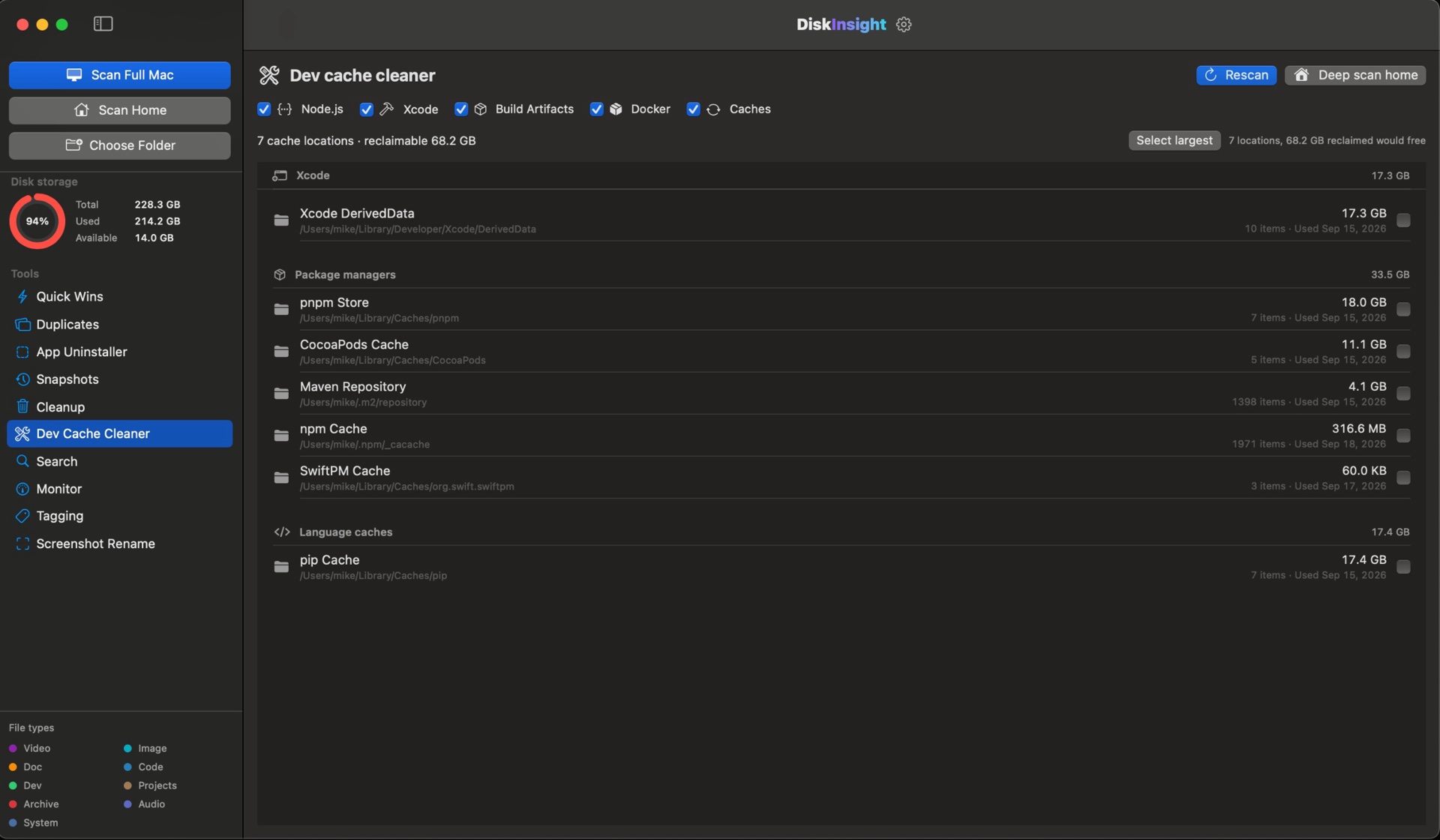
Twenty curated locations, sized individually
No guessing, no "system junk" checkbox. Every location shows its byte cost before you touch it.
Xcode & iOS
DerivedData, iOS simulators and CoreSimulator devices that pile up module caches and old runtimes.
Package managers
npm/pnpm/Yarn, pip, SwiftPM, CocoaPods and Carthage caches — safe to rebuild at any time.
Build systems
Gradle, Maven and Android Studio caches that grow with every compile and every dependency bump.
Deep home sweep
Stray .build, target, dist and node_modules trees the package managers no longer track — sized, not guessed.
Caches rebuild. Source doesn't get touched.
The Dev Cache Cleaner only ever targets regenerable tool data — never your source, never scripts, never project settings. Removals go to the macOS Trash first, so even a mistake isn't permanent until you empty it.
Read every byte for free. Clean with Pro.
The cache report is part of the free scan. Unlock once to reclaim the space.
Developer caches, answered
Is the Dev Cache Cleaner free?
Analyzing is free — you can see every cache folder and its exact byte cost without a license. Cleaning them is part of DiskInsight Pro, a one-time unlock.
Is it safe to clear developer caches?
Yes. These are regenerable files: build outputs, dependency metadata and download caches that the tools rebuild on demand. DiskInsight stages everything to the macOS Trash, so you can restore before emptying.
Will I lose my build state?
No. Cleaning DerivedData or node_modules doesn’t touch your source, your scripts or your project settings. The next build simply rebuilds what it needs — slower the first time, never broken.
Which tools are covered?
Twenty curated locations: Xcode DerivedData, Archives and iOS simulators, SwiftPM, CocoaPods, Carthage, Gradle, npm/pnpm/Yarn, pip, go-build and node_modules, among others.
How much can I reclaim?
On a long-lived developer Mac, expect tens of gigabytes. DiskInsight’s real scan found 68.2 GB reclaimable on one developer machine. Your number is free to check.
Your dev machine is hiding gigabytes.
Preview free · unlock cleanup once · regenerable only · 100% local